Building an iPhone app 95% from my phone
April 20, 2026
I recently launched Lingodex, my first ever iPhone app on the app store! It’s a language flashcard app that uses LLMs to quickly create reference flashcards for you in a target language you want to learn.
I’ve been dogfooding it a bunch in China the last month, and have found it pretty useful for myself. Google Translate and Pleco are very useful, don’t get me wrong, but I sometimes I just needed to remember very specific slang or things that I just couldn’t find on Pleco (or were translated entirely wrong by Google Translate).
I wanted to write a little about my experience creating it. What made this particular side project different was that I couldn’t be in front of a computer most of the time to work on it: I’ve been jumping around China the last month, nomad style, visting family. So I had to figure out the best way to get most of the development done while on the subway, or before family dinners, or while on the train.
I maybe had an hour or two at our hotel / accommodation per day to be in front of the computer, so I had to reserve that computer time for the most essential tasks that required it (more about that in a bit).
Some principles I had to accept in order to code this flexibly are:
- Fully lean into mobile vibe-coding for all meaningful development. For me, this was the Claude Code Max 5x plan, using the Claude Code mobile app with their built-in remote environments. This allowed me to have a meaningful amount of compute per day for the ideas / iterations I wanted to make. Using Anthropic’s remote environments allowed me to avoid most
/remote-controlissues that stemmed from trying to get around the Great Firewall. - Taking out the laptop to work on this project is extremely high cost. While traveling in China, there was very little time to take out my laptop for some deep focus. Practically, this meant that Testflight was the only environment I tested changes in. I’m sure I could have spent more time figuring out how to have multiple environments for this app, but the experience I wanted was to sling an idea to Claude, have Claude do the work, and then have it show up somehow on my phone later without too much hassle. The less time I had to actually take out my laptop to submit or upload a build, the faster it would be for me to iterate.
In practice, applying the principles was easier said than done. But I found some success in following these principles by implementing the following development pipeline below.
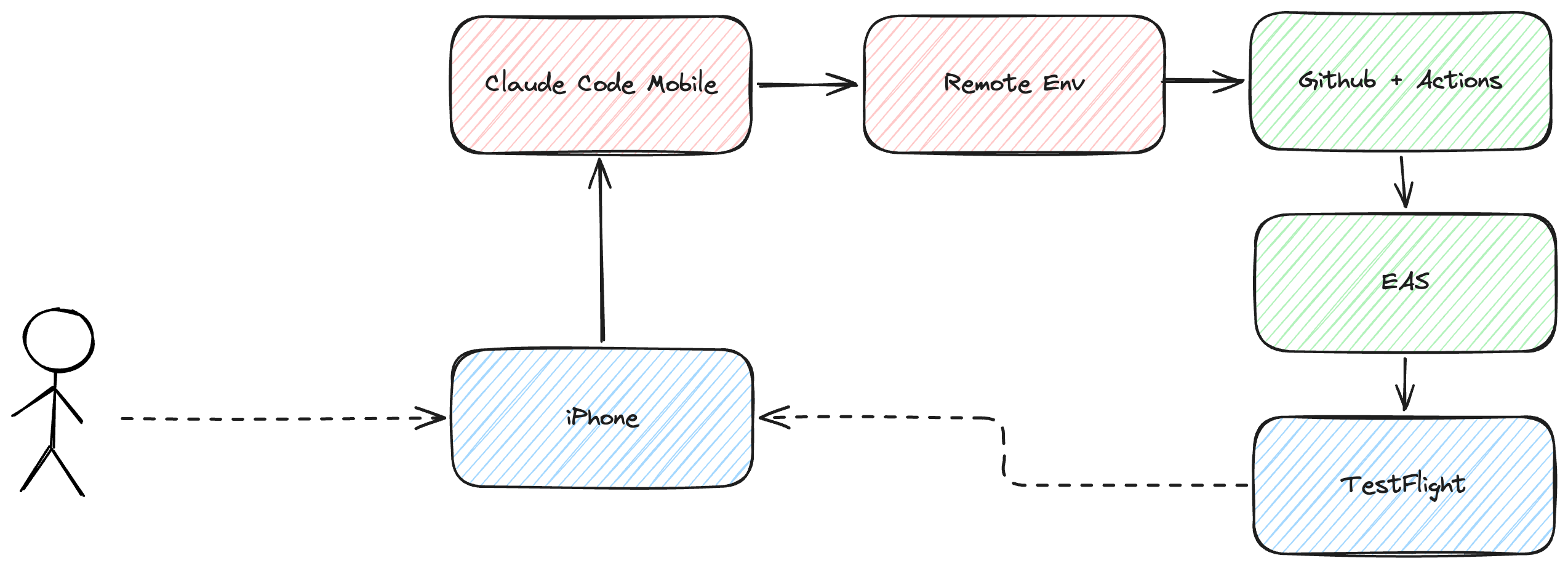
In a nutshell, it order to be able to “sling ideas and have it show up on my phone”, I set up an EAS pipeline on Github actions to automatically take in any of my changes and build/submit to Testflight. I also had similar hooks for Supabase set up for things like database migrations and edge function deploys.
Overall, the “development loop” would look something like:
- Test / dogfood the current version of the app
- Notice feedback
- Submit feedback to Claude Code via mobile
- Merge pull request via mobile
- Wait for EAS to build/submit
- Download the new version from Testflight
- Repeat
And this was a GREAT loop to be in when a lot of my time was moving, exploring, and reconnecting with family. I would take 5 minute “Claude breaks” if I needed a breather from the other life things I needed doing. I’m surprised at how many ideas I had while on-the-go!
Some tradeoffs that came with these principles:
- I basically didn’t even look at any of the code for this project, and I had to be ok with that. I did step in a few times to fix extremely minor issues, but otherwise this was a full “trust Claude to code, and trust my product sense” exercise.
- Mistakes would be shipped to Testflight often, especially when Claude misinterpreted what I had in my head. A lot of this could be fixed with clearer communication on my end, but some bugs were unavoidable.
At the end of the day, the things that still took time on my laptop were:
- Debugging build failures. Every now and then, EAS would fail, or Supabase would fail, and I would need to step in and troubleshoot.
- Debugging bigger bugs. Most bugs I noticed Claude could handle, but there were some that just required me to be locked-in in order to fix. In particular, integrating RevenueCat was a PITA since it was my first time doing so, and I for some reason could not get the annual plan to show up. I just ended up nuking the offerings I had and started over.
- Integrating new APIs. Every time I needed to add a secret key for some third-party provider, I needed to do that on the command line. So this was unavoidable.
- App Review materials. I underestimated how long it would take to do all of this. Apple asks for a lot and it required me to collect a lot of material in order to even submit something to the App Store. I’m sure there’s more to automate here too, with the App Store Connect API, but that’s a battle for another day.
Overall, I’m proud of myself for getting all the way through for this app release. Who knew my first iPhone app would be made in such a weird, nomadic way?